Showing posts with label my articles. Show all posts
Published July 03, 2008 by dr.emi creative design with 0 comment

Using MyBlogLog Email Signature As Your Website Promotion Services

Helloo...

I just try to learn how to brought my blog from my friends place, come into my blog. As lot of people said that META and Keyword can do this. But How if your blog on last page of the result page ? Offcourse you will be sad.

It ispirated from MyBlogLog.Com that has a Email Signature Widget Service, I just try to generate my signature code, then modify it.

  1. First Login into your MyBlogLog Home then click edit bio link menu on the sidebar.


  2. New page will delivery for you. Continue to click Widgets > Email Signature at the top of page. First you will see, default code template. You may change it, by click on Edit Signature Button.


  3. Customise you signature code. Then CLick Finish Button


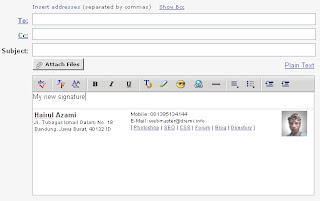
My preview signature after modified it on Macromedia Dreamweaver


And I am very happy, my friends impressive with my new signature. If I saw, some of my blog referral was came from mail page after read my mail. Offcourse, with no SPAM attack !!

Thanks to read my little bit tips.

Hairul Azami [aka dr.emi]
Read More
    email this
Published June 30, 2007 by dr.emi creative design with 1 comment

Top Tips of Dreamweaver

There are as many tips for Macromedia Dreamweaver MX as there are features multiplied by the number of Dreamweaver MX users. One sign of a great application is when people come up with new ways to use the tool, or in combinations with other tools that the application's designers never thought of.
Although these are some of my best tips and resources, there are many more. Be sure to check out the resources at the end of this article and look at some of the other sites that are out there on the web.

More ..
Read More
    email this
Published June 29, 2007 by dr.emi creative design with 1 comment

Referrals 2.0 was launched - Google AdSense

While some of you may already be familiar with referrals for Google products, this launch will greatly expand the inventory and functionality of referrals for AdSense publishers.

Below we've highlighted a few of the key benefits of referrals 2.0:


Expanded product inventory: While many of you have had success referring one of our Google products, some of you weren't able to find a product that fit the context of your site. Referrals 2.0 offers products from thousands of AdWords advertisers, so you can find the right ads for your sites.


Category and keyword targeting: With thousands of products available, it can be difficult to decide which ads will perform best on your site. That's why we give you the option to refer products by category and keyword. You can narrow down the types of ads you want to display and let AdSense figure out which ones will perform best on your site.
Whether you want ads for a specific category, advertiser, or product, referrals 2.0 will give you the control to decide.


Ad unit optimization: It can be tricky picking the best ads for your site, so we've included ad unit optimization for referrals. When you create a new referral ad unit, simply select the Pick best performing ads option. We'll then compare your selected ads to other relevant ads, and serve the ads we expect to perform best on your site.


Better targeting for pages with multiple themes: With standard contextual targeting, ads may not match up directly with the text around them if there are a number of themes on the page. With referrals, you can select unique "keywords" for each ad unit to narrow the targeting directly to the theme you want. Better targeting means higher earnings for your site.


Greater compensation for high-quality traffic: Since referrals are paid on a cost-per-action (CPA) basis, your traffic matters. If the traffic you send to advertisers is more likely to turn into a completed sale or lead, you will earn more with referrals.


Add your seal of approval: Unlike AdSense for content ads, our program policies allow you to make specific references to referral ads on your site. If you endorse the product that you are referring, feel free to let your users know. By adding your personal review of the products you refer, you can help your users make more informed choices.


To get started with referrals, click the AdSense Setup tab in your account, then click Referrals. If you don't see referrals 2.0 right away, please check back in a few days, as the feature will gradually become available in all accounts over the next few weeks. Please also keep in mind that for some languages, advertisers are just getting started so ad inventory may be limited at this time. We encourage you to check back frequently to see new offers.

If you have any questions about how to add a new referral unit to your site, be sure to check out the updated referrals section of the Help Center.

By Dan Friedman - AdSense Product Marketing

=========================================

Sebenarnya sejak akhir maret lalu, pusat pengembangan Google Adsense telah melaunching referrals beta .

Namun saat itu masih sedang diujicobakan. Uji coba ini terkait dengan menguji feature 2 dari referral beta ini.

Daa….nn akhirna saat ini telah dipublish Referrals 2.0 yang sedianya akan dipersembahkan untuk para publisher adsense mania.
Google tidak menyangkal kalo versi terbaru dari Refferal Adsense ini, merupakan pengembangan dari versi sebelumna, namun ada beberapa highlight yang patut dicermati dari perubahan / penambahan feature refferal adsense kali ini, tepatnya pada referrals beta v.2.0

Diantaranya adalah:

Expanded Product Inventory:
Sebelumna, publisher tidak mengetahui dengan jelas tentang statistik product refferal. Jadi dengan feature ini, publisher juga akan mengetahui content yang mengacu pada websitena, tentunya berdasarkan keyword yang dipasang pada masing refferal. Mulai dari ads word refferal sampe advertiser, sudah pasti akan dapat memanfaatkan feature ini dengan mudah.

Category and keyword targeting:
Jutaan keyword ternyata dapat menyulitkan publisher dalam menentukan target refferal na, naahh dengan feature tambahan ini, publisher akan dapat meng-kategorikan keyword yang begitu banyaknya. Jadi dalam menentukan target akan lebih spesifik kan….? Hehe..mahap nih rada-rada formal bahasana, abis keyboard na dah keras-keras kalo di pencet..hihi..Wah makin asik nii adsense na, kita bisa mengontrol per kategori dah …untuk keyword2 na..Ad unit optimization

Hmmm .. ada – ada aja ni adsense, dengan ad unit optimize ini, kita makin gampang mengoptimize ad yang akan ditampilkan. Tinggal pilih Performa konten terbaik untuk website na (Pick best performing ads option) ..kayakna adsense benar-benar mengerti apa aja (keyword) yang bner-bner cocok dan performa na terbaik untuk site lokasi kita.

Dengan refferal ini, kita dapat memilih Keyword yang bner2 unik (unique) untuk masing-masing ads.
Selain itu algoritma na juga dapat membantu kita dalam menentukan tema ads yang akan dipasang, ini berarti tema terbaik untuk masing-masing ads target pada halaman web , juga akan meningkatkan earning kita.. Tapi yaaa tergantung siiii gimana ngelola konten na..
Hehehe…

Greater compensation for high-quality traffic:
Sejak refferal diperkenalkan, konsep logika paid (pembayaranna), yakni paid on a cost-per-action (CPA) à (dibayar untuk setiap aksi kegiatan dalam ber-adsense), sebagai basis standar mengapa orang/publisher berlomba-lomba menambah konten blog/site na..Nah kali ini adsense makin menghargai kegiatan blogging ini, yakni dengan memberikan konpensasi terbaik untuk statistik kegiatan traffic site/blog yang tinggi, tempat adsense na dipasang. Jadi hal ini juga akan dapat meningkatkan pendapatan adsense kita.

Add your seal of approval
Berdasarkan program policies, google kini memberikan publisher keleluasaan untuk me-review setiap refferal adsnse yang akan bergabung dengan kita. Namun pada bagian ini, google menuntut kita untuk membaca dan mempelajari specific references terlebih dahulu untuk mengetahui spesifikasi user yang akan bergabung untuk di-review.

Hmmm,,, untuk memulai feature refferal baru ini, silakan klik Tab Adsense Setup, dan klik bagian Refferals. Untuk Refferal versi 2.0 ini pihak google baru baru ini telah memberikan fasilitas untuk bahasa indonesia na..hakhakhak… setau gue baru kali ini,kali aja dengan adana bahasa indonesia , bisa nambah semangat para publisher dan pengguna iklan adsense..hihikkssss waks...dziiiggsss..amin..hehe


Translate by dr.emi
Sumber : AdSense Product Marketing
Read More
    email this
Published June 29, 2007 by dr.emi creative design with 0 comment

New Format of AdSense Ads

As you'll recall, we recently introduced new formats for AdSense ads.
This week, we've added a new dimension for publishers in customizing these ad formats.
You've long been able to customize the size and colors of your ad units; now, you can also customize the shape by selecting between square, slightly rounded, or very rounded corners.

To get started with these new ad shapes, visit the 'AdSense Setup' tab in your account.
As with all format options like sizes and colors, different corner styles will perform better for different publishers.

We recommend that you choose the corner style that best matches the look and feel of your sites. Please keep in mind that if your page background color, ad background color, and ad border color are all the same, these new corners won't be visible.

This new option is part of our ongoing effort to improve the look and feel of our ads.

We're also working to give you even more choices to customize your ad formats while maximizing revenue and user satisfaction.

We hope you enjoy the new corner options, whether you choose to go edgy or bubbly.

By Teo Wickland - AdSense Product Marketing

=========================================

Untuk kedua kalina Google memperkenalkan format tampilan baru iklan adsense na. Kalo pada pengembangan sebelumna, adsense hanya menambahkan tampilan baru untuk pojok table iklan …
Kali ini dengan menambahkan format dimensi baru. Hmmm seperti biasa publisher masih dapat meng-customize format tampilanna juga. Seperti Warna dan Unit Ads na.


Lihat Detail Link na disini


Yang paling unik adalah, bagian tampilan ads, dapat di-customize juga untuk option shape na. Ada 4 (empat) macam pilihan untuk option shape ini: Square, Slightly, Rounded dan Very Rounded Corners.


Untuk mencoba format tampilan baru nii…, pilih tab AdSense Setup pada account adsense na. Kalo di bagian option corner sebelumna kita cuma melihat bagian option color, size & background color, nah disana sekarang dah bisa sekaligus meng-customize option corner shaping na juga.
Disarankan untuk pengaturan shape corner na , sesuaikan dengan tampilan halaman website Anda.

Asyik kan ? :D


H...mmm……. Google telah memberikan efek tampilan baru untuk adsense corner na…knapa ga dicoba aja..hehehe…
Seperti yang diharapkan pihak marketing google, option corner yang baru ini akan mampu meningkatkan kreatifitas publisher dalam menampilkan iklan – iklan pada adsense Google di website na masing – masing.
Selamat Mencoba…

Translate by dr.emi
Sumber : AdSense Product Marketing
Read More
    email this
Published March 16, 2007 by dr.emi creative design with 0 comment

New Forum on dremi.info

    email this
Published November 08, 2006 by dr.emi creative design with 0 comment

FreeLance Job from AKPRO.NET

The Job
After you are hired, your objective is to submit to us tutorial or articles frequently, we expect that you send us an entry each week. What you submit to us can be either a tutorial or an article, depending on what you choose and what you are best at.

The topics that you must outline if you are going to submit a tutorial are as follow; Adobe Photoshop, Adobe ImageReady, CSS, HTML, Macromedia Dreamweaver, Macromedia Flash and/or PHP. Before you write a tutorial on any of these topics, you must be familiar with them, as it will inflict on the quality of the tutorial.

The topics you must outline if you are going to submit an article are as follows; internet marketing, website development, search engines and general webmaster related articles. As stated before, you must be familiar with the topics before you write about them. Know that from time to time, we will ask you to create tutorials and articles on topics that we choose are necessary, if we see that you have the capability of doing so.

The Payment
Once you have submitted a tutorial, we will review it and look over it. If we see that it is relevant with its outlined topic, we will add it to our database. Once that is done, we will submit the tutorial to different tutorial search engines, such as Good-Tutorials.com. If after a week we see that it had been accepted and listed. We will increase your payment by $5.00 (CAN), so if your tutorial worth was $15.00 (CAN), we will increase it to $20.00(CAN). If it doesn't get accepted, your payment will be decreased by $5.00(CAN) and you will only be paid $10.00(CAN). So we advise that you pay close attention to Good-Tutorials.com and try to create tutorials that have a high chance of being accepted.

The maximum payment for a tutorial will be $50.00(CAN). The method of payment that we will be using to send you the money is Paypal, so please be sure to send us your Paypal info as soon as possible. If you do not have a Paypal account, we advise that you create one at Paypal.com. As so far this will be the only method of payment, until we expand. Know once you submit a tutorial, if we accept it, we will send you an email stating we have accepted it and how much we will pay for it.

Please know that once you have been paid, the tutorial or article will automatically be reserved by copyright law under our name, hence we will own the tutorial. And we reserve the right to modify or do whatever we wish with it.

Requirements
Before you accept this job, please be sure that you are familiar with the following job requirements, you have the; ability to communicate in a professional, mature and well-mannered way, ability to communicate and write with proper use of English and grammar, ability to communicate well and have the ability to speak descriptively. Know that if we see in your submissions that you demonstrate incapability's in the above requirements, we may have to cancel our agreement and you will lose the job.

If you are going to be writing tutorials for us, know that there is a tutorial guideline that you must follow in order to insure that you get the maximum payment for your tutorial. For a complete guide please refer to the following link:
http://www.danrichard.com/2006/04/08/writing-an-effective-tutorial-that-gets-accepted-to-pixel2life-and-other-tutorial-portals/

Know that if you are aiming high and want to earn $25.00(CAN) and above, we will be expecting tutorials such as the Extreme Template tutorials. Please refer to the following links for examples (the following tutorials are roughly worth $30.00(CAN)):
http://www.akpro.net/v3/extm04.html
http://www.akpro.net/v3/extm05.html
http://www.akpro.net/v3/extm06.html
http://www.akpro.net/v3/extm07.html

One of the largest factors that will affect your tutorial and how much its worth is its uniqueness and originality. If we see that the tutorials submitted are ripped or stolen, we will not accept it, no payment will be given and you will lose the job.

To Wrap Up
Know that after careful consideration, we have decided that we are only accepting tutorials for now. So if you want to write articles you will be pended until we seek new articles, then we will contact you. As stated above, we expect that we receive a submission weekly, and your payment will be sent a week later. Also, if you have expertise in a different outlines topic, but that is relevant (Java, Fireworks, etc) please contact us and inform us so we can make arrangements. If you have any questions, concerns please reply. Please do reply if you have accepted the job and its terms, so we can begin.

Sincerely,
Aysar Khalid | info@akpro.net
AKPro Administrator
AK Productions Studios™
http://www.akpro.net/
Read More
    email this
Published October 19, 2006 by dr.emi creative design with 0 comment

How to Build Amazing Adsense programs

How to Build Amazing Adsense programs


You know that at the first time I see the adsense programs, I am so tierd to learn how to make it. But know by the google ansense help center, I was create my adsense.

Steps:

#1 Create your some blog (blogspot.com)
Register Your name/company name as blogger sub domain. Like dremi468.blogspot.com

#2 You will get an email shotly about Blogger confirmation register

#3 Now start to build your adsense, bu tyou should be sure that you have
created some bolg post. However Google cannot approve your adsense application
witahout any post to your blog.

#4 Enter this URL: http://google.com/adsense/
Then register there
Or you can follow adsense wizard from your blogger page. >> Template - Adsense

#5 Registered!!!

#6 Adsense will response you shortly by mail

#7 If adsense approve your form, It good reason for you.

#8 Now start from login into http://google.com/adsense

#9 Adsense SetUp >> Create Your Channel

#10 Get your adsense code by click the Product Menu.

#11 Add codes to your website.

#12 And Last You must be dilligent to post a usefull thing for every one in the world

#13 Sooo Simple steps isn't ????

Thank You Friends -- webmaster@dremi.info
Read More
    email this
Published October 17, 2006 by dr.emi creative design with 0 comment

Replace chars and rename file or folder name on Dreamweaver Root Site

Did you know that, dreamweaver could help us on maintain website directory??

Here you are.


1. How to replace chars on root site files:

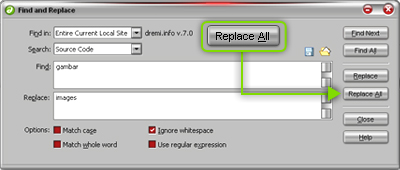
First open your dreamweaver, stay there. Press Key [CTRL+F] then type in Find box, your char to replace (ex: img). Move to Replace Box, type your new char (ex: images). OK it so easy. Now Click Replace All Button inside. Ooouuu, on the few second, your old char will be replaced with new char (images).

2. How to rename file or folder:

You will rename file or folder name, without take broken link on root site. First look at right side dreamweaver panel window. There, Right Click on your file or folder name to rename. It will be showed you sub menu, then chose edit-rename. In edit mode, type your new file or folder name, then press [ENTER] or click wherever you want. No more time, you will received a confirm window to Update file or folder links on Root Site. Now press Update All Button. Wowww, you now may break for few moment. Successfull, now your file or folder name was renamed, and it could be sure that no broken links on root files site.

OK friend!! It so easy. Hope could Help You!!! Thanks
Read More
    email this